Next Batch · Starts 8 Sep 2026

AI UX DESIGN
BOOTCAMP

Learn UX. Use AI. Build real products.

Learn how to use AI across the product design process — from research and UX to UI, testing and shipping.

5 weeks · 15 live sessions · 100% online · Live mentor guidance

🗓️ Next batch starts 8 Sep 2026

5 WEEKS
15 LIVE SESSIONS
5 WORKFLOWS
1.5 hrs PER SESSION

Why learn this way?

AI has given designers many new tools. But knowing many AI tools is not the same as knowing how to use AI in your design work. This bootcamp teaches you the complete workflow — from finding the right problem to testing your design and putting it live.

Learn the process, not just the tools

AI tools will keep changing. We focus on how to think and work with AI, so you can adapt when new tools come in.

Get feedback from a real mentor

Every session is live. Ask questions, show your work, fix problems and move forward with mentor guidance.

By the end of 5 weeks, you will have

🔍Validated product idea
🗺️UX flows + sitemap
📱High-fidelity prototype
🧪Usability test report
🌐Live landing page
📝Portfolio case study
🎬Product demo video
🎓Programme certificate

One complete portfolio project — from idea to working product.

Our first batch is done. See what they built.

Our first AI UX Design Bootcamp batch has completed the programme. These are real projects built by our students — from research and UX to prototype, testing and launch.
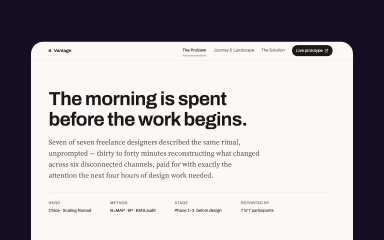
Project Management tool for Freelancers

Vantage Point

A project management tool for freelancers

Research Structure Design Test Ship
View project ↗
Career Path Decision Guide for College Students

Career Verse

A career decision guide for college students

Research Structure Design Test Ship
View project ↗
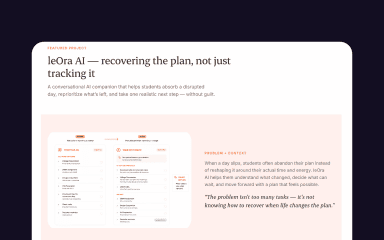
A conversational AI companion that helps students absorb a disrupted day, reprioritize what’s left, and take one realistic next step — without guilt.

leOra AI

An AI companion that helps students take one realistic next step.

Research Structure Design Test Ship
View project ↗

These are not sample projects. They were built during our first batch.
Batch 01 · Completed August 2026

Learn the 5 steps from idea to product

Each week, you work on one part of the product design process.
3 live sessions per week · Tuesday / Wednesday / Thursday · 1.5 hours each

01
Week 1

Find & Validate the Problem

Sessions 1–3

Start with a product idea and use AI to research the problem, users and market. You will learn how to:

  • Research competitors
  • Understand user behaviour
  • Create personas
  • Map the user journey
  • Check whether your idea is worth building
You'll have Research brief · Persona · Journey map · Validated idea
02
Week 2

Plan the UX

Sessions 4–6

Turn your idea into a clear product structure. You will learn how to:

  • Create information architecture
  • Build sitemaps
  • Create user flows
  • Think through different situations users may face
  • Set your visual direction
  • Start your design system in Figma
You'll have UX flows · Sitemap · Mood board · Design system
03
Week 3

Design Faster with AI

Sessions 7–9

Use AI to explore and create UI ideas faster — then use your design skills to improve them.

You'll work with: Google Stitch · v0 · Figma Make · Figma · Framer AI

You will learn how to:

  • Generate UI ideas
  • Improve screens in Figma
  • Create a working prototype
  • Write better UX copy
  • Check accessibility
You'll have UI screens · High-fidelity prototype · UX copy · Accessibility review
04
Week 4

Test & Improve

Sessions 10–12

Don't just assume your design works. Test it with real users and use their feedback to improve your product. You will learn how to:

  • Plan a usability test
  • Test your prototype
  • Read heatmaps and user behaviour
  • Find usability problems
  • Improve your design based on what users actually do
You'll have Test report · Heatmaps · Improved prototype · Responsive layouts
05
Week 5

Build, Publish & Present

Sessions 13–15

Take your design beyond Figma. You will learn how to:

  • Prepare your design for development
  • Build a live landing page
  • Create your portfolio case study
  • Build your portfolio website
  • Record a product demo
  • Present your work
You'll have Live landing page · Case study · Portfolio site · Demo video

The AI tools you'll work with

You won't just watch tool demos. You'll use these tools while building your own product.

Perplexity AIPerplexity AI
Gemini AIGemini
ChatGPT AIChatGPT / Claude
Fire Fly AIAdobe Firefly
Ideogram AIIdeogram
Google Stitch AIGoogle Stitch
V0 by Vercel AIv0 by Vercel
Figma Make AIFigma Make
Framer AIFramer AI
Manus AIManus AI
Maze AIMaze AI
Clueso AIClueso
Figma AIFigma
Research · Perplexity AI · Gemini · ChatGPT / Claude · Manus Visual Design · Adobe Firefly · Ideogram UI & Prototyping · Google Stitch · v0 by Vercel · Figma Make · Figma · Framer AI Testing & Demo · Maze · Clueso

Tools change. Your design process stays with you.

Their words. Not ours.

Our first batch has completed the programme. Here's what they had to say about their experience.

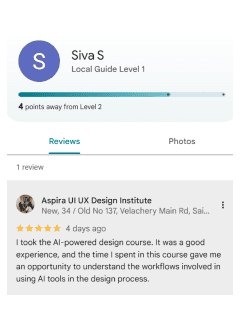
Siva - Google Review with 5 Star Rating
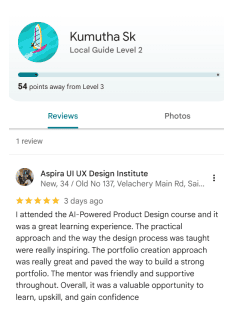
Kumutha - Google Review with 5 Star Rating

5.0 ★ Google Reviews · Batch 01

rambal - Mentor

Your mentor for the bootcamp

Rambal

Founder, Aspira Design · UX Designer · Educator · Speaker

I've been designing digital products since 1999. Over the years, I've worked on real products, worked with teams across different industries, and mentored thousands of designers. In this bootcamp, I'll show you how AI can be used in the actual product design process — not just how to use AI tools.

25+ Years in UX 10,000+ Designers Mentored 300+ Products Shipped 2 Published Books Worked with HDFC · Visa · Sodexo

Join the September Batch

100% Online · Live mentor · Session recordings for lifetime

Finish with your own product showcase

Your final session isn't another lecture. You will present the product you built — the problem you solved, how you designed it, what you tested and what you learned.

Real audience

Alumni · Founders · Recruiters

8-minute presentation

Your product · Your story · Live demo

Recorded

Get a product demo clip you can share on LinkedIn.

Certificate

Complete the programme and receive your Aspira certificate.

Batch 01 completed its Product Showcase in August 2026.

Is this bootcamp for you?

This bootcamp is for people who already know the basics of design and want to learn how AI can become part of their everyday design workflow.

Aspira UX/UI Alumni

You already know the UX/UI basics and want to add AI to your design process.

Working Designers

You are already designing products and want to bring AI into your daily workflow.

Frontend Developers

You know how to build things and want to understand the product design side better.

Founders & PMs

You have a product idea and want to take it from concept to prototype using AI.

Self-taught Designers

You've learned UX/UI on your own and now want to build complete products.

Graphic Designers

You understand visual design and want to move into UX and product design.

One important thing before you join

This is not a beginner Figma or UX course. Before the first session, you should already know the basics of Figma — including frames, components and auto-layout. You should also be comfortable using common design tools.

Basic Figma knowledge A laptop with 8GB+ RAM Comfort using design tools A product idea you'd like to work on

New to UX/UI? No problem. Start with Aspira's UX/UI Foundations programme first, or talk to us and we'll help you choose the right starting point.

Talk to us →

Think this bootcamp is right for you?

Fill in the short form below. Our team will contact you and help you understand the programme before you confirm your seat.

Your Name
Your Email
Your Mobile Number
Your Qualification
Your Background

Our team will contact you with the next steps.

Ready to build your first AI-assisted product?

Learn the workflow. Build your product. Test it. Put it live.
Next batch starts 8 Sep 2026.

Apply for the September Batch

5 weeks · 15 live sessions · 100% online

Chat with us